

We walk you through the process of downloading, registering, and logging into your Playabets account with the mobile application.

Playabets remains one of Mzansi’s leading betting sites, as they offer a comprehensive sportsbook with horse racing and a vast array of casino games with live dealers. Punters can rest assured when playing with Playabets, as they are a legal betting site in South Africa, being licensed and regulated by the Mpumalanga Gambling Board.
Since the early 2010s, smartphones have taken the mobile world by storm, and now you are rarely seen without one in your hands. Bookmakers have recognised the rising trend of smartphones and in-house applications, and have invested a vast amount of resources in creating betting apps tailored for the South African punter.
Playabets has created a betting app that is fast and fully responsive, making it perfect for placing bets on live in-play betting, where odds change rapidly. This Playabets app guide will show you everything from downloading the app to registering and logging into your betting account, and how to place bets on the go.
How to Download the Playabets App (APK)?
Currently, the Playabets app is only available for download on Android devices. For iOS and Huawei devices, Playabets also offers a fully mobile website that is optimised to deliver smooth navigation, fast loading times, and access to all betting markets without the need to download an app. The Playabets app can be downloaded in South Africa directly from the Playabets website, and you can download the app by following these easy steps:
- Head over to the Playabets site: Enter the Playabets URL: https://playabets.co.za on your mobile browser. Click the Playabets icon to head to the homepage.

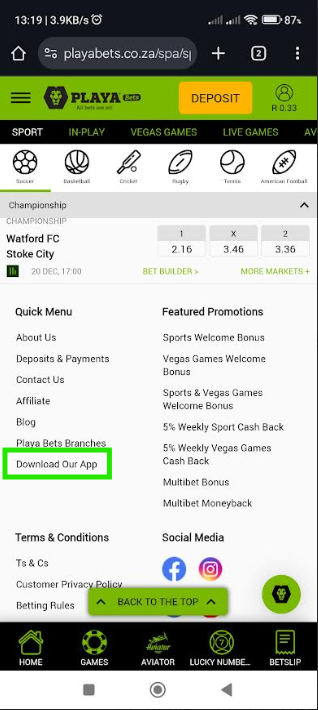
- Scroll down to the app: Scroll towards the bottom of the homepage and click on ‘Download Our App’ to enter the Playabets mobile app download page.
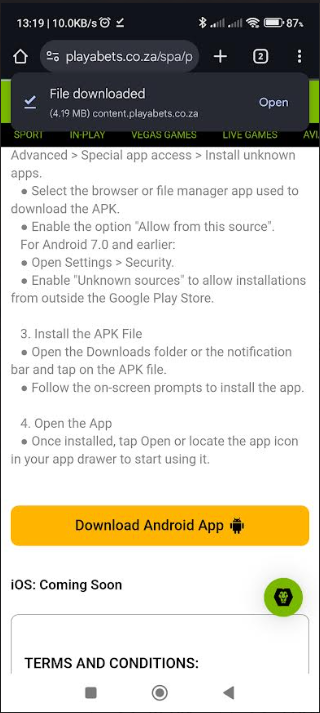
- Download the Playabets app: Click on the ‘Download Android App’ button to download the Playabets app.
- Enable installation from unknown sources: If the app cannot be installed, you will need to click ‘Enable from unknown sources’ in the ‘Security’ section of your settings. Once the app has been installed, you can change this setting.
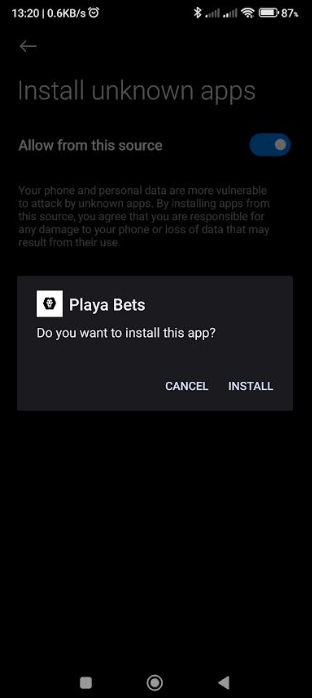
- Install the APK file: Open the downloads folder and click on the Playabets APK file to install the app.
- Open the app: After installation, you can search for the app to open and run the Playabets app.
How to Register and Login on the Playabets App?
Once you have installed the app, the next step will be to sign up with Playabets. Registering on the Playabets app is fast and straightforward, and takes only a few minutes. Please note that you need to be at least 18 years old and have a valid ID number or a valid passport to register with Playabets. You can follow these easy steps to register with Playabets on their mobile app:
- Open the Playabets app: Locate and open the Playabets app on your mobile device.
- Click the Sign Up Button: Click the black and yellow ‘SIGN UP’ button located at the top right of the homepage to sign up to Playabets.
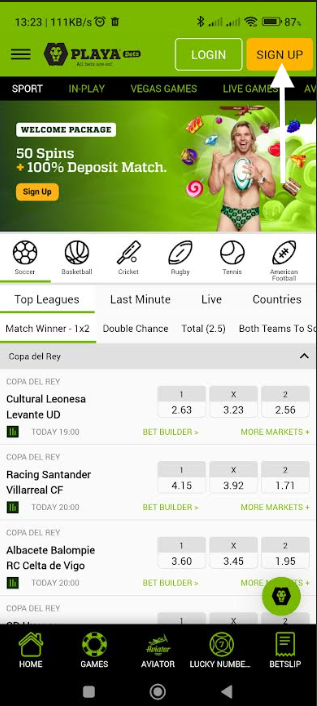
- Select the bonus: Enter the promo code or select any of the currently advertised welcome bonuses that you would like to claim. If you would like further information about the Playabets bonuses and promotions, you can read all about it in our Playabets Review.
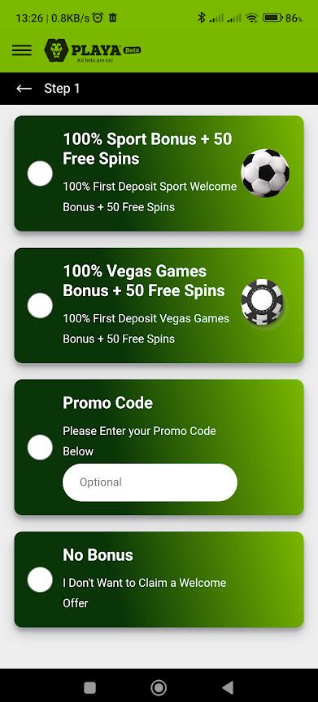
- Enter your personal details: Enter your name, surname, phone number and email address. Select whether you have a valid ID or passport number.
- Verify your phone number: Enter the four-digit OTP and click the ‘VERIFY’ button to verify your cellphone number.
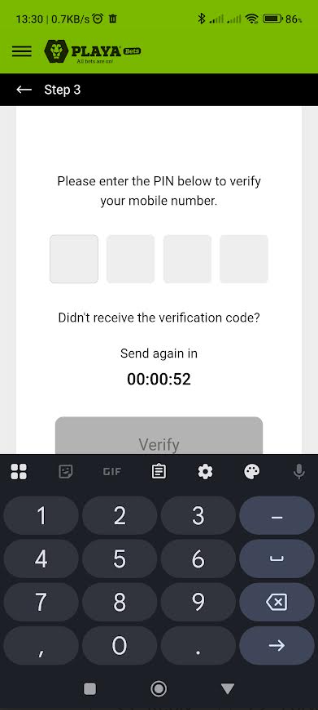
- Create your account: Tick the box that confirms that you have read and agree to the terms and conditions. Click the “Register” button to complete your Playabets registration.
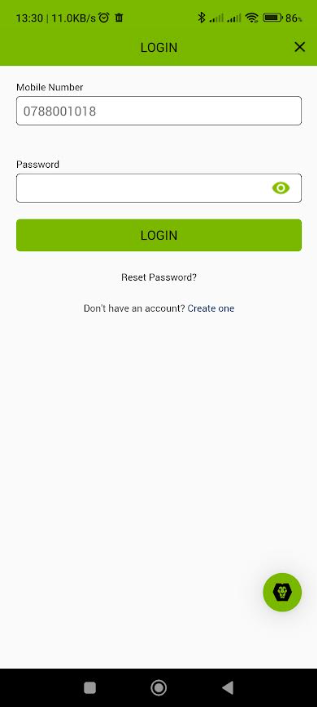
Once you have completed the registration process for your Playabets account, you will be able to log in using the Playabets app to gain access to your Playabets account. To log into your Playabets account, click the ‘LOGIN’ button on the top right-hand corner.
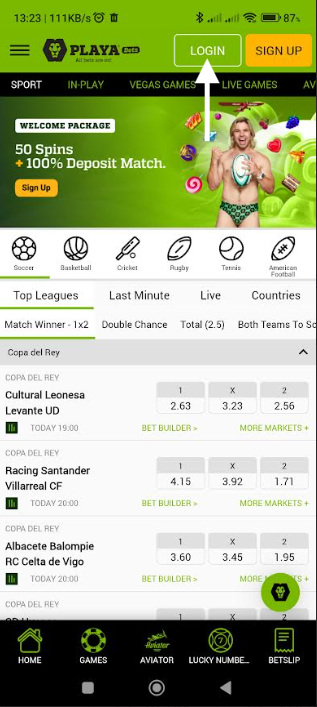
Your phone number and the password you created during the registration process are used to log into your account. If you forget your password, you can click the ‘Forgot Password’ banner to change your password.
How to Place a Bet on the Playabets App?
After you log into your Playabets account, the fun can begin. Placing a bet on the app is the same as using a browser, except that the app is faster, more responsive and more efficient for mobile use.
Use the burger menu to select the sport you would like to wager on or search for the event you’re interested in. Select the bet you like and click on the bet slip icon to place your wager.

In the bet slip section, you can enter your wager or change the bet type, i.e. select a multiple or multiple single bets. Once you are happy with your slip, click the ‘Submit’ button. Additionally, you can share your bet slip with your friends for easy access to your tips.
How to Deposit and Withdraw Funds on the Playabets App?
Depositing and withdrawing from your Playabets account is the same as using the browser. When depositing funds into your account, click the ‘DEPOSIT’ button located at the top right-hand corner. On the deposit screen, enter the amount you wish to deposit and the preferred payment method. Click ‘Submit’, and the funds will be deposited into your Playabets account, which is normally processed instantly.
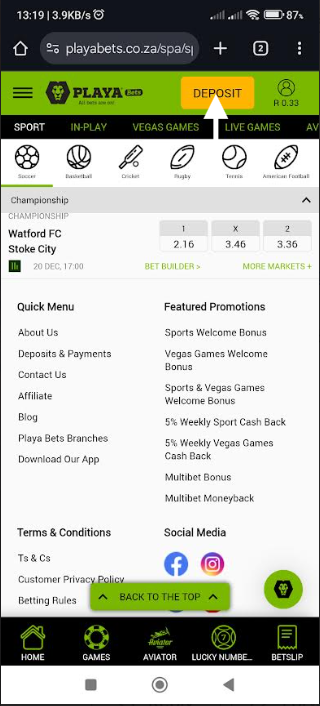
To withdraw funds from your Playabets account, you need to click the profile icon button located next to the ‘DEPOSIT’ button. Click the withdrawal button, and you will be taken to the withdrawals section. Select your banking account that is in your name and the amount you would like to withdraw, and click the ‘SUBMIT’ button to complete your withdrawal. Please note that withdrawals can take up to two business days to be processed.
If you are interested in reading more about Playabets and their operations, you can read all about it in our Playabets Review.
Playabets Mobile App: FAQ
Q: What is the Playabets app?
A: The Playabets app is a dedicated mobile application created for quick and easy access to your Playabets account. Players can login to their account and place bets anytime and anywhere using the Playabets app.
Q: How to register with the Playabets app?
A: Once the Playabets app has loaded up, select the ‘Sign Up’ button on the top right-hand corner. Enter your details and verify your phone number to complete your account registration.
Q: How to log in with the Playabets app?
A: Load up the Playabets app, and click the ‘Login’ button on the top right-hand corner. Enter your phone number and the password that you created, and click the ‘Login’ button to log into your account.
Q: How to place a bet with the Playabets app?
A: Once you have logged into your account, you can search for your favourite leagues and matches. Alternatively, you can select the icon that corresponds to the sport or casino game that you would like to wager on. Thereafter, select the bet you fancy, choose a wager you would like to stake, and then select ‘Confirm’ to place your bet.
Writer/Betting Tipster
I have been in the iGaming industry for a decade and am an avid sports bettor and fan. I have expanded my betting knowledge to create articles on the iGaming industry focusing on online casino content and sports betting analysis for several regions, including South Africa. I cover various sports, including Soccer, Cricket and Horse Racing. All my predictions, tips and insights are thoroughly researched and I aim to help fellow punters in beating the bookies!