Play.co.za Mobile App Review South Africa (2026)
The vast majority of punters in South Africa are using their mobiles to bet which gives them the opportunity to bet anywhere and anytime. They are no longer compelled to bet from one location. Whereas a number of bookmakers have developed betting apps for the Android and iPhone platforms, Play.co.za has opted for something different, instead of having a betting application, Play.co.za has a mobile-friendly betting website.
The betting platform by Play.co.za provides the same betting markets, promotions, features, and depositing and withdrawing services available in the desktop version. From betting on football, rugby, cricket, horse racing, and other sports, Play.co.za will make your betting more convenient without the hassle of downloading any app.
What is the Play.co.za App?
Play.co.za does not have a dedicated mobile app but rather they have designed a mobile site that is accessible on all electronic devices and best of all, there is no downloading required. In other words, one is able to use all Play.co.za betting services by just opening a website through the web browser on his/her smartphone or tablet.
The mobile version features:
- Access to the whole sportsbook
- Live betting
- In-play stats
- Management of accounts
- Money deposits and withdrawals
- Promotions
- Customer service
As there is no play.co.za app to be downloaded, players always get access to the most recent version of the site.
How to Download the Play.co.za App on Android and iPhone
As there are no dedicated apps for Play.co.za, players cannot download anything from Google Play Store or Apple App Store.
What you should do is just:
- Launch Chrome, Safari or any other browser.
- Go to the official website of Play.co.za.
- Sign in or register if you not already a player
- Bet on your favourite sport or casino game
There is an easier way to access the Play.co.za website and that is by adding the site on your home screen as a shortcut. Simply follow these steps to adding the site as a shortcut
Guide for Android users
- Open Play.co.za in Chrome.
- Tap the three-dot at the top right of your screen
- Select Add to Home Screen.
- Confirm, now Play.co.za is added to your home screen
Guide for iPhone users
- Open the site in Safari.
- Tap the Share button.
- Select Add to Home Screen.
- Tap Add.
This places a Play.co.za icon on your phone for one-tap access.
How to Register and Login on the Play.co.za Mobile App
Since there is no mobile app for Play.co.za, players simply need to log onto the mobile version and register. Here is our step by step guide to assist you
- Visit Play.co.za using your mobile browser.
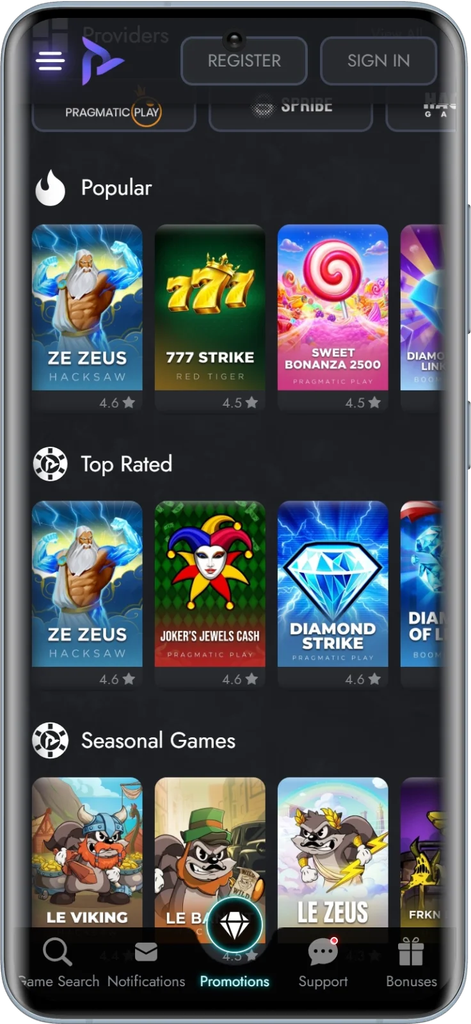
Play.co.za home page
- Click on the flashing Register button
- Fill in all your personal details as well as your username and password.
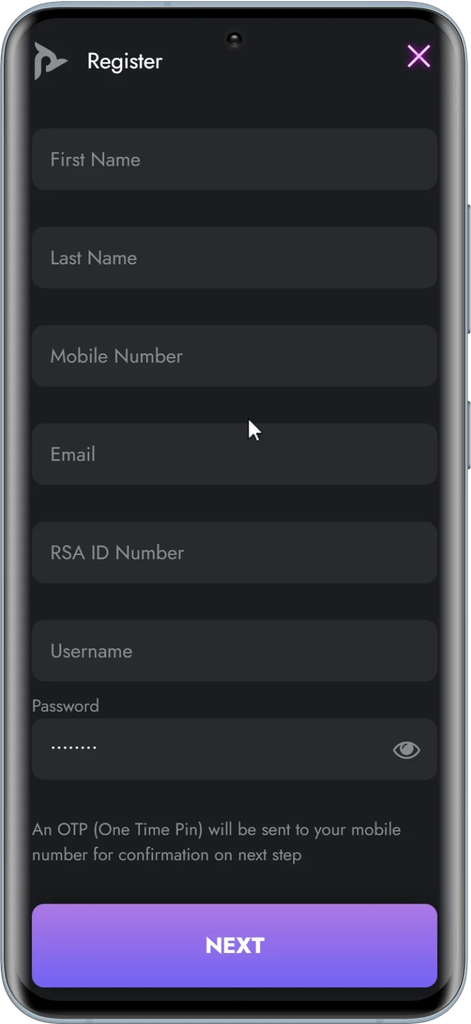
Play.co.za registration form
- Verify your account if required.
New players need to complete their FICA verification by submitting a copy of their ID and proof of residence. This is very important as no withdrawals will be processed until this verification is complete.
Logging In on the play.co.za mobile version
Here is a step by step guide on how to access your play.co.za account account.
- Go to the play.co.za website on your mobile device
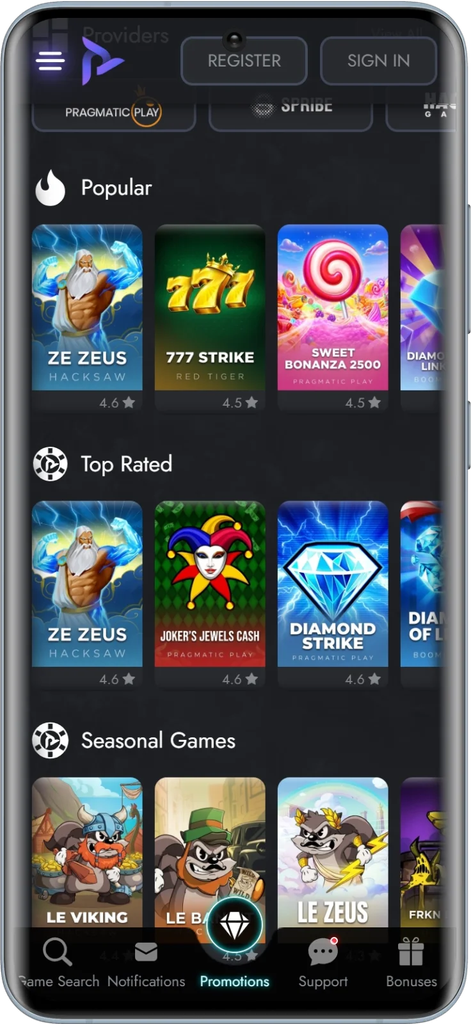
- Click the “Sign In” button
- Enter your mobile number/email and password
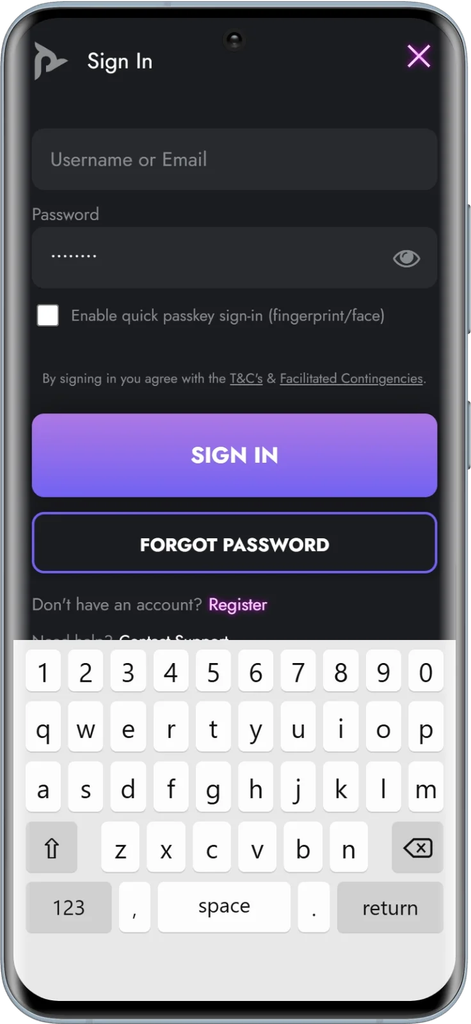
- Click on the Login button to access your Play.co.za account
Features of the Play.co.za Betting App
The Play.co.za mobile version is very similar to a betting app without the hassle of downloading and using up memory on your phone. Here are some of the features of the mobile version
- Fast instant win casino style games: Play fast and easy instant win casino games with immediate results.
- Live in-match statistics and lottery draws: Track live in-match statistics and live lottery draws information to know where you stand with your bets.
- Live betting on international lotteries (Powerball, MegaMillions, UK 49s): Participate in live betting on the most popular international lotteries with the ability to see live results and choose from different options to place bets.
- Betting tracking and cashout: Check your ongoing bets and use the cashout feature to guarantee yourself a payout before the match ends.
- Instant deposits/withdrawals: Place your deposits and ask for your withdrawals to be made quickly and easily.
- Easy FICA document upload: Upload your necessary FICA directly on the mobile version
How to Place Bets Using the Play.co.za App
These are the simple steps to placing your bets on the Play.co.za app
- Login into your Play.co.za account.
- Select the sport of your choice.
- Select the competition and the event that you want to bet on.
- Pick your odds of choice to add your pick to the bet slip.
- Input your stake amount in the space provided.
- Confirm your bet to place your wager immediately.
Play.co.za App Payment Methods and Withdrawals
You can now make deposits and withdrawals directly from the play.co.za mobile version
These are some of the most popular deposit options available to players on the site
- Instant EFT(OZOW)
- Betting vouchers
- Bank transfers
- Debit cards
Deposits
Deposits are generally processed quickly, allowing punters to begin betting almost immediately.
Withdrawals
Withdrawals can also be requested directly through the mobile website. Processing times vary depending on the method you use. Instant cash is the quickest and takes just a few minutes to receive your winnings.
Is the Play.co.za App Safe and Licensed in South Africa?
Yes, the play.co.za is perfectly safe as there is SSL encryption, secure login systems and account verification procedures that are in place to protect all users on the mobile version. Play.co.za is fully legal as they are licensed by the Western Cape Gambling and Racing Board.
Play.co.za App Bonuses and Promotions
These are the most popular promotions currently available on the Play.co.za site. All the bonuses are accessible on the mobile version.

Play.co.za Welcome Offer
Play.co.za welcome bonus gives out a three-pack offer to new players. You get a 100% risk-free casino bonus on your first deposit, along with a 10% sports free bet worth up to R1,000. On your second deposit, you receive a 75% risk-free casino bonus, and on your third deposit, you receive a 125% risk-free casino bonus.
100% Cashback Promotion

100% Cash Back Bonuses
The 100% Cashback promotion is among the most sought-after betting promotions. In this promotion, if the qualifying bet loses due to just one selection, Play.co.za will return your bet stake in cash back form to give you a chance to place another bet.
Multibet Boost

Receive an Odds Boost on all your multi bets with 3 or more selections. Players can receive up to a 1000% odds boost.
Common Play.co.za App Problems and Fixes
Cover common issues:
- Mobile site not loading
- OTP not received
- Forgot password
- Biometric login not working
- Site slow on certain networks (Vodacom, MTN, etc.)
Solutions:
- Clear browser cache
- Switch from Wi-Fi to mobile data
- Contact Play.co.za Support:
- Live chat
- Email: [email protected]
- Live chat
Pros and Cons of the Play.co.za Mobile App
Pros
- No play.co.za app download required
- Excellent speed
- Compatible on Android and iPhone devices
- Complete sportsbook is accessible
- Fast mobile website
- Live betting facility
- Safe banking transactions
Cons
- No specific Android app
- Needs an internet browser
- Push notifications have limitations compared to native apps
Frequently Asked Questions
How do I download the Play.co.za app?
Play.co.za does not provide a mobile application of its own. You can visit the website via your mobile browser or create a bookmark to access it quickly.
Is the Play.co.za app compatible with iPhones?
No. At the moment, there is no Play.co.za app on the Apple App Store. Users with an iPhone can access the mobile site optimised for their device via Safari.
How do I sign into the Play.co.za app?
Visit the Play.co.za site on your mobile browser, tap the Login button, and input your username and password.
Can I make withdrawals using the Play.co.za app?
Yes. Though there is no specific app for this, you can make withdrawals directly via the Play.co.za mobile site.
Is it safe to use the Play.co.za app in South Africa?
Yes. The Play.co.za mobile site employs secure encryption technology and is licensed to operate in South Africa as a gambling website.
Writer / Betting tipster
I am what you call a sporting all-rounder with my favourite sports being rugby, football and cricket. I have been actively writing rugby and football articles for the last decade. These include previews, reviews and interesting topical pieces. I am a huge fan of Liverpool and a passionate supporter of the Springboks. My interests in recent years have also included iGaming as this is one of the fastest growing betting markets. Follow me for the best rugby odds in South Africa as I continue to find you the best bookie to place your bets.